3 Tips for Using Videos on Instagram
August 11, 2015

Instagram entered the social market at a perfect time. It was a time when people were fed up with the unimportant excess on Facebook, but were still searching for the perfect platform to share every detail of their day.
Enter Instagram.
Only two months after this online mobile, photo-sharing and now, video-sharing social media service launched, Instagram already had one million subscribers. Fast-forward two years, Facebook purchased Instagram for $1 billion dollars.
Today Instagram is the #1 photo sharing social media platform. It’s home to 130 million active monthly users, and over 1 billion photos and videos are liked each and every day.
With this amount of social proof, of course, there are opportunities for businesses to interact with their audience.
Let’s talk about best practices your business can take to harness the power of videos on Instagram.
 The key with hashtags is to be consistent. If you do decide to implement hashtags, try your best to use them mindfully on every post. Choose 4 or 5 main keywords associated with your video and use those hashtags. Once you’ve tagged your video with the hashtags, click through each hashtag and be active within them. This will organically direct traffic back to your Instagram feed.
Bonus Tip: Don’t include your hashtags directly in your sentences like #this. A best practice is to finish your caption and include your handful of hashtags at the end.
The key with hashtags is to be consistent. If you do decide to implement hashtags, try your best to use them mindfully on every post. Choose 4 or 5 main keywords associated with your video and use those hashtags. Once you’ve tagged your video with the hashtags, click through each hashtag and be active within them. This will organically direct traffic back to your Instagram feed.
Bonus Tip: Don’t include your hashtags directly in your sentences like #this. A best practice is to finish your caption and include your handful of hashtags at the end.
All you get is 15 seconds
Videos on Instagram are meant to be short, sweet and poppy. In the app, you’re able to upload the video of your choice and select which area of the video you’d like to be played. Be strategic with this and only select the most powerful 15 seconds. Bonus Tip: Try Instagram’s new app called Hyperlapse. It speeds up a lengthy video and compiles it into only 15 seconds.#Hashtags
Many people hate the use of hashtags, thinking they are used and abused. In all honestly, they are. Many people use the most generic, popular hashtags often not hiding the fact that they are trying to get more likes. This approach will bring a lot of spammy content to your page. That’s not what we’re going for here.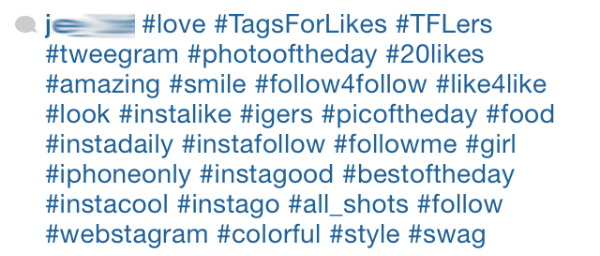 The key with hashtags is to be consistent. If you do decide to implement hashtags, try your best to use them mindfully on every post. Choose 4 or 5 main keywords associated with your video and use those hashtags. Once you’ve tagged your video with the hashtags, click through each hashtag and be active within them. This will organically direct traffic back to your Instagram feed.
Bonus Tip: Don’t include your hashtags directly in your sentences like #this. A best practice is to finish your caption and include your handful of hashtags at the end.
The key with hashtags is to be consistent. If you do decide to implement hashtags, try your best to use them mindfully on every post. Choose 4 or 5 main keywords associated with your video and use those hashtags. Once you’ve tagged your video with the hashtags, click through each hashtag and be active within them. This will organically direct traffic back to your Instagram feed.
Bonus Tip: Don’t include your hashtags directly in your sentences like #this. A best practice is to finish your caption and include your handful of hashtags at the end.